Do you need to pay to practice trading?
Usually not. The practice itself, trading pretend money at real market prices, is free at many brokerages. What a subscription mostly buys is lessons and a friendlier screen, and you can get both for free too.
Two kinds of trading simulator
A trading simulator lets you buy and sell with pretend money and see what would have happened. They come in two kinds:
- A brokerage paper account. Real market prices, the same orders as real trading, pretend money. Alpaca, the brokerage Nicholas links to, includes one free with every account, with no deposit needed.
- A simulator inside an app. Often game-like, sometimes with its own prices, and sometimes behind a monthly subscription.
Both can teach you something. Only the first one runs on the same plumbing you would use with real money.
What a subscription pays for
A practice app at about $20 a month costs about $240 a year. For that you usually get three things: a practice account, lessons, and an easy screen. The practice account is free at a brokerage. So the real question is whether the lessons and the screen are worth $240 to you.
A free practice setup, step by step
- Open a free brokerage account with paper trading. At Alpaca, paper trading is included and needs no deposit.
- Learn the basics first. What a candle is, what a stop-loss does, and what fees cost. Start with how to read a candlestick chart and what is a stop-loss?
- Practise with a realistic amount. Use the amount you would really invest, not a million pretend dollars.
- Count the fees on every practice trade. Paper accounts usually don't charge them, but real crypto trades cost about 0.15% to 0.25% each. See crypto trading fees, explained.
- Set a stop-loss before you enter. Every time, not after the price starts falling.
- Give it weeks, not days. A few lucky trades mean nothing.
Where Nicholas fits
Nicholas is a free beta tool that runs on that free paper account. It trades it for you under strict rules: a stop-loss on every trade, at most 15% of the account in one crypto, and a circuit breaker that stops new buys after a bad day. Every box and number on the screen explains itself in plain words when you tap it, and the built-in Academy starts at "what is crypto?" and unlocks one unit at a time.
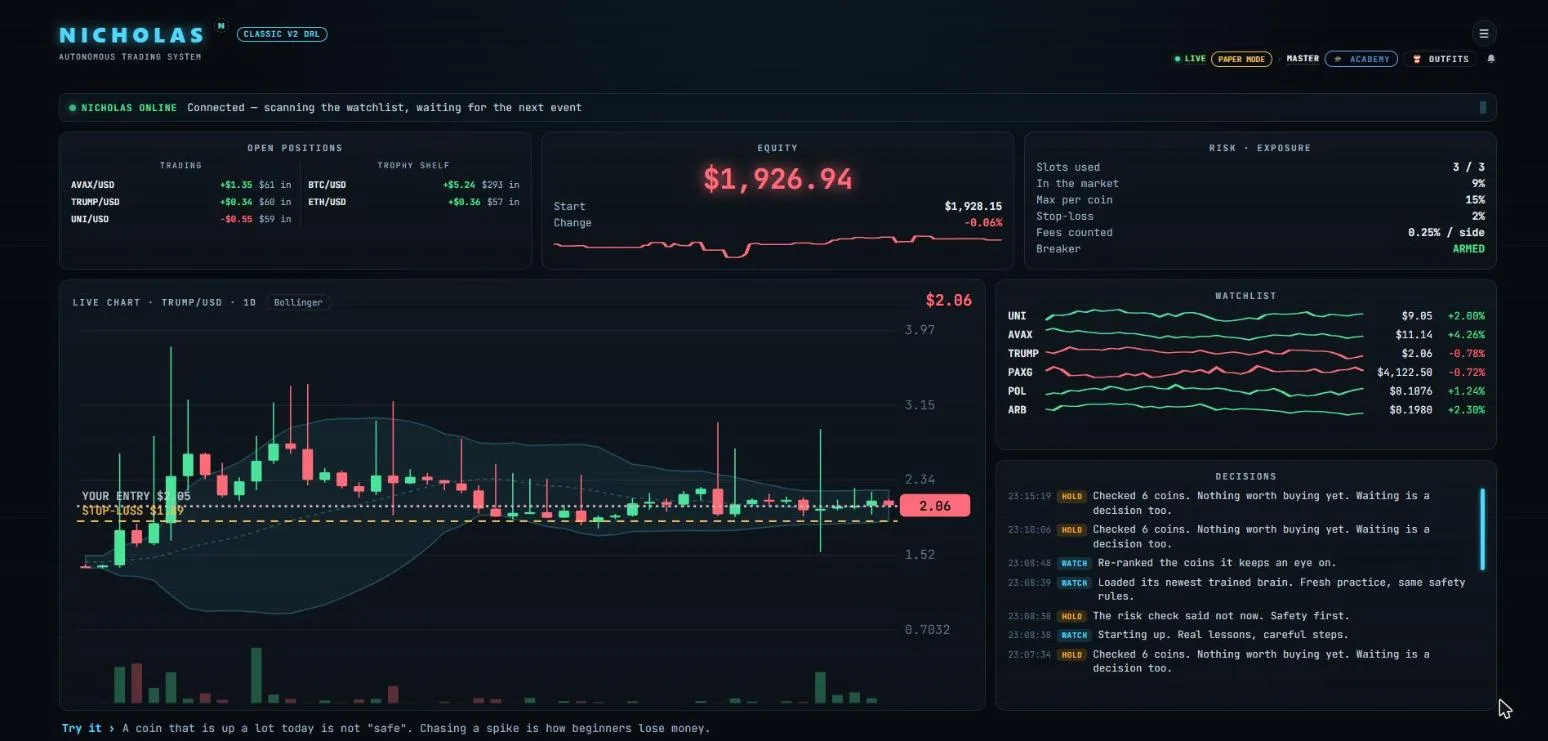
It's invite-only for now, and paper trading and the Academy are free for good; real money comes with Core. It can trade, but it can never withdraw your money, and it does not promise any profit.
Is free practice as good as the real thing?
No practice is. Paper trading flatters you: no fees, perfect fills and no nerves. Treat paper results as the best case, and read paper trading for beginners for how to use it well.